Amazon SES vs Resend: How My Clients Send Email for a Tenth of a Cent
Amazon SES vs Resend, compared by an agency that runs client email on SES — real per-email pricing, what the emails look like, and who should pick which.

I once watched a small business pay $240 a year to send about forty emails a month. That works out to fifty cents an email. For that money you could print each one, buy a stamp, and post it — and you’d still have change left for a biscuit.
That’s the whole reason this post exists. Email sending is one of those invisible parts of a website — the contact form, the booking confirmation, the “your application was approved” note — and most businesses have no idea what it costs or how it works. So here’s how I do it for my clients, and why the answer is Amazon SES and not the trendier option.
The short version: Amazon SES charges $0.10 per 1,000 emails with no monthly fee. Resend charges $20/month once you outgrow its free tier. SES is roughly four times cheaper per email; the trade is a genuinely painful setup. My clients get the SES price without ever touching the setup — the first 1,000 emails every month are free, and every email goes out from their own domain with no watermark.
Amazon SES vs Resend in one paragraph: both are services that send email on behalf of your website — contact-form notifications, receipts, status updates. SES is Amazon’s raw infrastructure: $0.10 per 1,000 emails, pay-as-you-go, no monthly minimum, but a setup process only a developer could love. Resend is the developer-friendly wrapper: quicker to start, nicer dashboard, and about four times the per-email price once you’re past the free tier.
What that means in practice:
- Price per email: SES $0.0001 — Resend $0.0004 on the paid plan
- Monthly minimum: SES none — Resend $20/month after the free tier
- Free tier: Resend gives 3,000 emails/month (capped at 100/day)
- Setup: Resend takes an afternoon — SES takes a developer

The pricing math: $0.10 per 1,000 vs $20 a month
Let’s do actual numbers, because “cheaper” is a word and words are free.
Amazon SES charges $0.10 per 1,000 emails. Not per month — per thousand sent, whenever you send them. A typical small-business website sends somewhere between 50 and 500 emails a month: contact forms, quote requests, confirmations. On SES, 500 emails costs five cents. A busy month with 2,000 emails costs twenty cents. You could fund a year of it with the coins in your car door.
Resend’s paid plan is $20 a month for up to 50,000 emails. That’s a fine price if you send anywhere near 50,000 emails. Almost no small business does. So in practice you’re paying $240 a year for capacity you’ll never touch — the gym membership model, except the gym is a mail server. (Resend does have a free tier of 3,000 emails a month, capped at 100 a day, and honestly for a lot of small sites that’s enough. More on when Resend is the right call later — I’m not here to pretend it’s a scam. It’s just priced for startups, not for the local bakery.)
One detail worth knowing with SES: it charges per recipient, not per message. Send one email to 100 people, that’s 100 billable emails. At these prices it’s a rounding error, but it’s the honest fine print.
For my clients, the arrangement is simpler than either: the first 1,000 emails every month are free. Past that, you’re into fractions of a cent per email. Nobody is paying $20 a month to receive their own contact form.

The catch with SES — and why you’ll never see it
Here’s the part the comparison articles are built on: SES is cheap because Amazon sells it like a warehouse sells pallets. You want retail service, you pay retail.
Setting up SES properly means verifying your domain, adding DNS records so inboxes trust you (SPF, DKIM, DMARC — three acronyms that decide whether your email lands in the inbox or the spam folder), then writing an application to Amazon to get out of “sandbox mode,” where your account starts. Yes, an actual application, with sentences, explaining what you’ll send and how you handle bounces. The AWS console walks you through all this with the warmth and charm of a tax form.
Estimates online put SES setup at four to fifteen hours for someone doing it the first time. One developer did the maths and concluded Resend is actually cheaper for most startups once you price in that engineering time — and for a startup paying developer salaries, he’s right.
But here’s the thing about hiring an agency: that cost is mine, and I’ve already paid it. The domain verification, the DNS records, the sandbox exit, the bounce handling — done once, reused for every client. You get pallet pricing with retail service. It’s the one genuine advantage of the “boring infrastructure plus a person who’s already fought it” model: the hard part happened before you arrived.
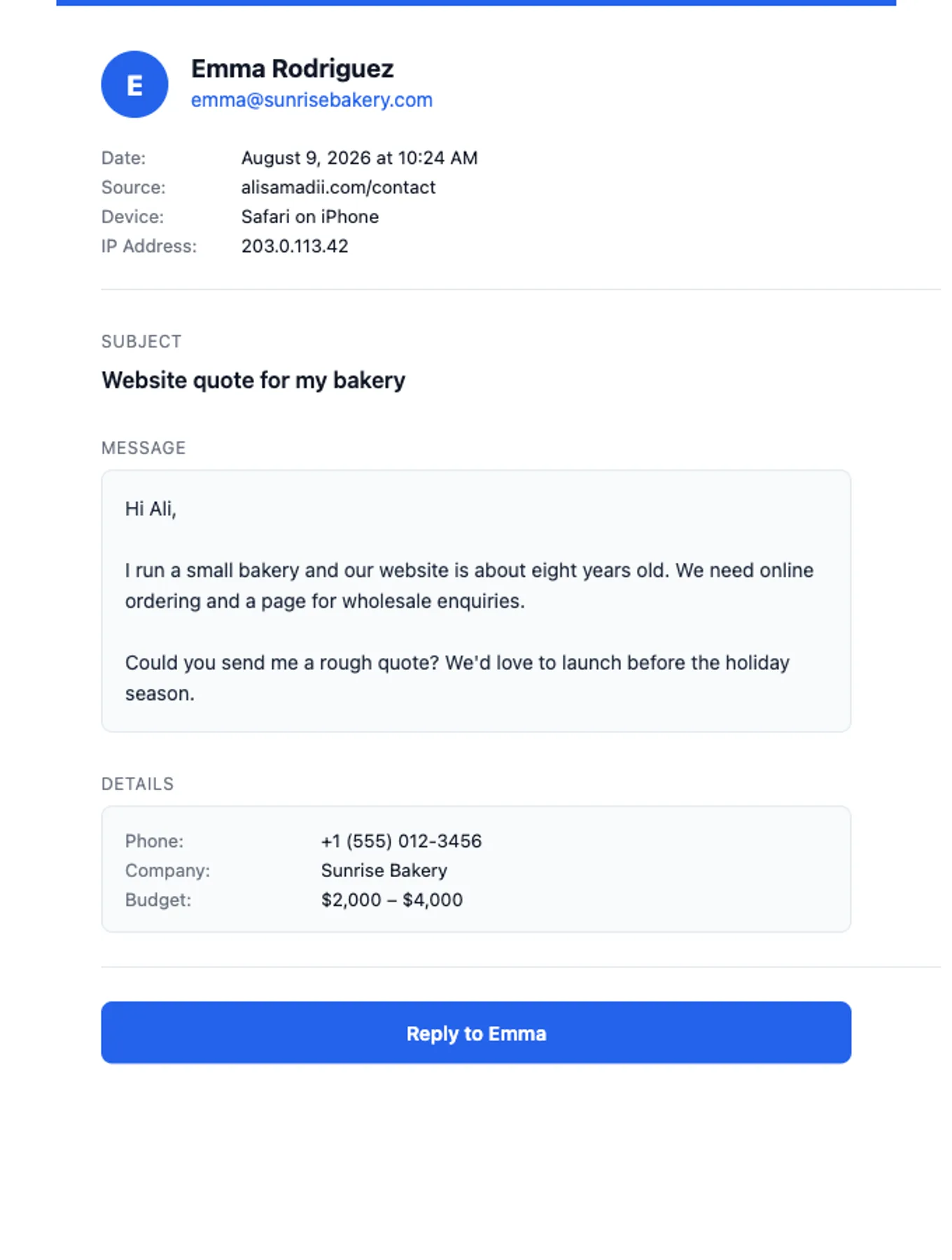
What the actual email looks like
The screenshot above is the real template — not a mockup. When someone fills in the contact form on a client’s site, this is what lands in the client’s inbox, usually within a couple of seconds.
A few deliberate choices in there:
- Who, at a glance. The sender’s name and email sit at the top with a big initial, so you know who’s writing before you’ve read a word.
- Context you didn’t ask for but will want. Date, which page the form was on, what device they used, and their IP. Useful the day you get a suspicious message, invisible the rest of the time.
- The message, unmangled. Line breaks preserved, in a readable box, no fonts having an identity crisis.
- Extra fields ride along. If your form asks for phone, company, or budget, those show up in a Details section automatically — the template doesn’t need rebuilding every time your form grows.
- One button: Reply. It opens a reply straight to the sender, subject pre-filled. Replying from your inbox also just works, because the email’s reply-to is the visitor’s address, not some noreply@ black hole.
It’s built the unglamorous way — table-based HTML — because that’s what renders correctly in Gmail, Outlook, and Apple Mail alike. Email HTML is stuck in roughly 2003, and fighting that fact is how you get emails that look great in the design tool and broken everywhere else.
And if the standard template doesn’t fit: I design custom email templates to match your business. Your colours, your logo, your tone. An email is often the first thing a customer receives from you — it should look like it came from you.
There’s also quiet security in the plumbing. The contact endpoint only ever delivers to your inbox — the form on your site physically cannot be pointed at anyone else, so nobody can hijack it to spam strangers. And it rate-limits to five submissions per ten minutes per visitor, which filters out most bots before they cost you anything.

No watermark — which matters more than you’d think
Free email tools pay for themselves somehow, and the usual currency is your footer: “Sent via …”, “Powered by …”, a little badge telling every recipient you used the free plan. Harmless on a hobby site. Less harmless when the email is the product.
One of my clients is an organisation that emails students their application results — approved or not approved. Think about that email from the student’s side. It’s news they’ve been waiting on. If it arrives from a personal Gmail with a “sent via free-form-tool” footer, some part of the reader’s brain files the whole organisation under possibly two people in a garage. The same decision, sent from @theirdomain.com, cleanly formatted, no third-party badge anywhere — reads like an institution.
Every email my clients send is like that: their domain, their design, no watermark, no badge. The recipient sees the business and only the business. It’s a small thing that compounds, because email is usually the highest-volume touchpoint a business has. You might redesign the website every few years; the emails go out every day.
Every email, on the record
The part I’d want as a business owner: nothing here is fire-and-forget. Every email sent on a client’s behalf is logged, and clients see the log in their Client Hub dashboard on the Emails page.
- Every email, listed — contact-form messages, notifications, the lot, newest first.
- Open any of them and see the exact email that was delivered — not a summary, the actual thing, pixel for pixel, straight from the archived copy.
- Search and filter by text, type, or any date range.
- Export a range as a PDF — pick the dates, click export, get a clean document listing every email sent in the period. Handy for records, disputes, or proving to a committee that yes, the notification did go out on the 14th.
If you’ve ever wondered “did that email actually send?” — this is the answer, permanently, with receipts. (Literally. Some of the emails are receipts.)
When you should NOT do it my way
Time for the bit agencies skip.
If you’re a developer building your own project — just use Resend. Genuinely. The free tier covers 3,000 emails a month, setup takes minutes, the dashboard is lovely. SES only wins when someone else absorbs the setup pain or your volume is big enough for the 4× price gap to matter. Under 50,000 emails a month, the absolute difference is pocket money; paying yourself to fight the AWS console to save $15 is bad maths.
If you send three emails a month and they’re all personal replies — your normal inbox is fine. Not everything needs infrastructure. A plain email from you, typed by you, is sometimes exactly the right tool.
Where my setup earns its keep is the middle: a real business, real customers, emails going out automatically from a website, and no developer on staff. That’s who SES quietly punishes with its setup and who Resend quietly overcharges with its flat fee — and it’s exactly the gap an agency should fill.
Send enough email that it should look professional; send too little to justify $20 a month. That’s most small businesses I’ve ever met.
What this costs you with me: usually nothing
To put it all in one place — email sending on my client sites means: sent through Amazon SES from your own domain, first 1,000 emails a month free, fractions of a cent after, no watermark, a designed template (standard or custom to your brand), spam-filtered and locked to your inbox, and every email archived and exportable from your dashboard.
If your current website’s contact form goes to a Gmail address, or worse, goes nowhere and you’ve been wondering why it’s so quiet — get in touch. The form on my site uses exactly the system described above, so consider your first message a product demo. If it doesn’t arrive, I owe you a very awkward apology.
Straight answers
Which is cheaper, Amazon SES or Resend? SES, by roughly four times per email: $0.10 per 1,000 versus Resend’s $20/month for 50,000 ($0.40 per 1,000). But if your volume is small and nobody is handling SES setup for you, Resend’s free tier (3,000/month) can make it cheaper in practice — your time counts as money.
Is Amazon SES really $0.10 per 1,000 emails? Yes — pay-as-you-go, no monthly minimum. It bills per recipient, so one email to 100 people counts as 100 emails. Extras like dedicated IPs cost more, but a small business needs none of them.
Why not just send email from Gmail or my hosting provider? Automated email from a personal Gmail hits spam filters fast and looks unprofessional. Cheap hosting mail servers share reputation with every spammer on the same box. Proper sending services authenticate your domain (SPF, DKIM, DMARC) so inboxes trust the mail — that’s the difference between arriving and vanishing.
Do the emails have a “sent via” watermark? Not on my setup. Every email comes from your domain with your template and nothing else. Watermarks are how free email tools advertise themselves; they’re the first thing to get rid of when the emails represent a real business.
What does the client actually see? A live log in their Client Hub dashboard: every email sent, searchable and filterable, with the exact delivered email viewable in full, and any date range exportable as a PDF.
Can the contact form on my site be abused to spam people? Not this one. The endpoint only delivers to your own inbox — the recipient isn’t something the form can change — and it’s rate-limited to five submissions per ten minutes per visitor, which stops most bots at the door.
Image credits: Photos by cottonbro studio, Tara Winstead, Brett Sayles, Gustavo Fring, and Zulfugar Karimov on Pexels. The contact-email screenshot is our own template.